Friday, September 19, 2008

Get Session Id

In this example we are going to make a program in which we will find the session id which was generated by the container.

HttpSession session = request.getSession(); Inside the service method we ask for the session and every thing gets automatically, like the creation of the HttpSession object. There is no need to generate the unique session id. There is no need to make a new Cookie object. Everything happens automatically behind the scenes.

As soon as call the method getSession() of the request object a new object of the session gets created by the container and a unique session id generated to maintain the session. This session id is transmitted back to the response object so that whenever the client makes any request then it should also attach the session id with the requsest object so that the container can identify the session.

The code of the program is given below:
import java.io.*;
import javax.servlet.*;
import javax.servlet.http.*;

public class SessionIdServlet extends HttpServlet{
protected void doGet(HttpServletRequest request, HttpServletResponse response)
throws ServletException, IOException{
response.setContentType("text/html");
PrintWriter pw = response.getWriter();
HttpSession session = request.getSession();
String id = session.getId();
pw.println("Session Id is : " + id);
}
}

web.xml file for this program:

PUBLIC "-//Sun Microsystems, Inc.//DTD Web Application 2.3//EN"
"http://java.sun.com/dtd/web-app_2_3.dtd">


Zulfiqar
SessionIdServlet


Zulfiqar
/SessionIdServlet


The output of the program is given below:

Pre- Existing Session

In this example we are going to find out whether the session is pre-existing or not.

Consider a situation where servlet want to use only a existing session. It is not always a good idea to create a new session. To perform this work we have one overloaded method getSession(boolean) of the request object. If we don't want to create a new session then we should use getSession(false).

In the example below we have used the method getSession(false) which will test whether the session is null or not. If there will be no session then the new session will be created by the method getSession().

The code of the program is given below:

PreExistingSessionServlet.java
import java.io.*;
import javax.servlet.*;
import javax.servlet.http.*;

public class PreExistingSessionServlet extends HttpServlet{
protected void doGet(HttpServletRequest request, HttpServletResponse response)
throws ServletException, IOException {
response.setContentType("text/html");
PrintWriter pw = response.getWriter();
pw.println("Testing The Session : ");
HttpSession session = request.getSession(false);
if(session==null){
pw.println("There is no session");
pw.println("Can we create a session for you. Creating.........");
session = request.getSession();
}
else{
pw.println("Session already exists");
}
}
}

web.xml file for this program:

PUBLIC "-//Sun Microsystems, Inc.//DTD Web Application 2.3//EN"
"http://java.sun.com/dtd/web-app_2_3.dtd">


Zulfiqar
PreExistingSessionServlet


Zulfiqar
/PreExistingSessionServlet


The output of the program is given below:

To Determine whether the Session is New or Old

In this program we are going to make one servlet on session in which we will check whether the session is new or old.

To make this program firstly we need to make one class named CheckingTheSession. Inside the doGet() method, which takes two objects one of request and second of response. Inside this method call the method getWriter() of the response object. Use getSession() of the request object, which returns the HttpSession object. Now by using the HttpSession we can find out whether the session is new or old.

The code of the program is given below:
import java.io.*;
import javax.servlet.*;
import javax.servlet.http.*;

public class CheckingTheSession extends HttpServlet{
protected void doGet(HttpServletRequest request, HttpServletResponse response)
throws ServletException, IOException {
response.setContentType("text/html");
PrintWriter pw = response.getWriter();
pw.println("Checking whether the session is new or old
");
HttpSession session = request.getSession();
if(session.isNew()){
pw.println("You have created a new session");
}
else{
pw.println("Session already exists");
}
}
}

web.xml file for this program:


Hello
CheckingTheSession


Hello
/CheckingTheSession


The output of the program is given below:

Session Tracking

As we know that the Http is a stateless protocol, means that it can't persist the information. It always treats each request as a new request. In Http client makes a connection to the server, sends the request., gets the response, and closes the connection.

In session management client first make a request for any servlet or any page, the container receives the request and generate a unique session ID and gives it back to the client along with the response. This ID gets stores on the client machine. Thereafter when the client request again sends a request to the server then it also sends the session Id with the request. There the container sees the Id and sends back the request.

Session Tracking can be done in three ways:

1. Hidden Form Fields: This is one of the way to support the session tracking. As we know by the name, that in this fields are added to an HTML form which are not displayed in the client's request. The hidden form field are sent back to the server when the form is submitted. In hidden form fields the html entry will be like this : . This means that when you submit the form, the specified name and value will be get included in get or post method. In this session ID information would be embedded within the form as a hidden field and submitted with the Http POST command.
2. URL Rewriting: This is another way to support the session tracking. URLRewriting can be used in place where we don't want to use cookies. It is used to maintain the session. Whenever the browser sends a request then it is always interpreted as a new request because http protocol is a stateless protocol as it is not persistent. Whenever we want that out request object to stay alive till we decide to end the request object then, there we use the concept of session tracking. In session tracking firstly a session object is created when the first request goes to the server. Then server creates a token which will be used to maintain the session. The token is transmitted to the client by the response object and gets stored on the client machine. By default the server creates a cookie and the cookie get stored on the client machine.
3. Cookies: When cookie based session management is used, a token is generated which contains user's information, is sent to the browser by the server. The cookie is sent back to the server when the user sends a new request. By this cookie, the server is able to identify the user. In this way the session is maintained. Cookie is nothing but a name- value pair, which is stored on the client machine. By default the cookie is implemented in most of the browsers. If we want then we can also disable the cookie. For security reasons, cookie based session management uses two types of cookies.

Send Redirect in Servlet

When we want that someone else should handle the response of our servlet, then there we should use sendRedirect() method.

In send Redirect whenever the client makes any request it goes to the container, there the container decides whether the concerned servlet can handle the request or not. If not then the servlet decides that the request can be handle by other servlet or jsp. Then the servlet calls the sendRedirect() method of the response object and sends back the response to the browser along with the status code. Then the browser sees the status code and look for that servlet which can now handle the request. Again the browser makes a new request, but with the name of that servlet which can now handle the request and the result will be displayed to you by the browser. In all this process the client is unaware of the processing.

In this example we are going to make one html in which we will submit the user name and his password. The controller will check if the password entered by the user is correct or not. If the password entered by the user is correct then the servlet will redirect the request to the other servlet which will handle the request. If the password entered by the user is wrong then the request will be forwarded to the html form.

The code of the example is given below:

html file for this program:


New Page 1


Enter your name        


Enter your password 


import java.io.*;
import javax.servlet.*;
import javax.servlet.http.*;

public class SendRedirectServlet extends HttpServlet{
protected void doPost(HttpServletRequest request, HttpServletResponse response)
throws ServletException, IOException {
response.setContentType("text/html");
PrintWriter pw = response.getWriter();
String name = request.getParameter("username");
String password = request.getParameter("password");
if(name.equals("James")&& password.equals("abc")){
response.sendRedirect("/SendRedirect/ValidUserServlet");
}
else{
pw.println("u r not a valid user");
}
}
}


import java.io.*;
import javax.servlet.*;
import javax.servlet.http.*;

public class ValidUserServlet extends HttpServlet{
protected void doGet(HttpServletRequest request, HttpServletResponse response)
throws ServletException, IOException {
PrintWriter pw = response.getWriter();
pw.println("Welcome to roseindia.net " + " ");
pw.println("how are you");
}
}

web.xml file for this program:

PUBLIC "-//Sun Microsystems, Inc.//DTD Web Application 2.3//EN"
"http://java.sun.com/dtd/web-app_2_3.dtd">


Zulfiqar
SendRedirectServlet


Zulfiqar
/SendRedirectServlet


Hello
ValidUserServlet


Hello
/ValidUserServlet


The output of the program is given below:


Time Updater in Servlet

In this program we are going to make one program on servlet which will keep on updating the time in every second and the result will be displayed to you.

To make this servlet firstly we need to make a class named TimeUpdater. The name of the class should be such that it becomes easy to understand what the program is going to do. Call the method getWriter() method of the response object which will return a PrintWriter object. Use the method getHeader() of the response object to add a new header. We can also use setHeader() in place of getHeader(). The setHeader() method overrides the previous set header. Now by using the PrintWriter object display the result on the browser.

The code of the program is given below:


import java.io.*;
import java.util.*;
import javax.servlet.*;
import javax.servlet.http.*;

public class TimeUpdater extends HttpServlet {

public void doGet(HttpServletRequest request, HttpServletResponse response)
throws ServletException, IOException {
PrintWriter pw = response.getWriter();

response.addHeader("Refresh", "1");
pw.println(new Date().toString());
}
}

Multiple values for a single parameter

In our program it may be that we may have multiples values for a single parameter like in checkboxes. We are going to make one program over it.
To make such a servlet which we have made one html form from where the values will be passed to the controller. In this program we have used the checkbox which will have the same name but with different values. We have one more button submit, on pressing this button the request will be forwarded.

Now in the servlet that is working like a controller will retrieve the values we have entered in the html form by the method getParameterValues() which returns the array of String. At last to retrieve all the values from the array use the for loop. The output will be displayed to you by the PrintWriter object.

The code of the program is given below:

Index.html


Insert title here


Which of the whisky you like most


RoyalChallenge.

RoyalStag.

Bagpiper.


GetParameterValues.java
import java.io.*;
import javax.servlet.*;
import javax.servlet.http.*;

public class GetParameterValues extends HttpServlet{
protected void doPost(HttpServletRequest request, HttpServletResponse response)
throws ServletException, IOException {
response.setContentType("text/html");
PrintWriter pw = response.getWriter();
String[] whisky = request.getParameterValues("whisky");
for(int i=0; i pw.println("
whisky : " + whisky[i]);
}
}
}

web.xml file for this program:


Hello
GetParameterValues


Hello
/GetParameterValues


The output of the program is given below:

Here is the result of the above selection:

Passing Parameter Using Html Form

This is a very simple example in which we are going to display the name on the browser which we have entered from the Html page.

To get the desired result firstly we have to make one html form which will have only one field named as name in which we will enter the name. And we will also have one submit button, on pressing the submit button the request will go to the server and the result will be displayed to us.

In the servlet which will work as a controller here picks the value from the html page by using the method getParameter(). The output will be displayed to you by the object of the PrintWriter class.

The code of the program is given below:


New Page 1


Login


Please enter your username and password


Username


Password


LoginServlet.java
import java.io.*;
import javax.servlet.*;
import javax.servlet.http.*;

public class LoginServlet extends HttpServlet{
public void doGet(HttpServletRequest request, HttpServletResponse response)
throws ServletException, IOException {
response.setContentType("text/html");
PrintWriter out = response.getWriter();
String name = request.getParameter("username");
String pass = request.getParameter("password");
out.println("");
out.println("");
out.println("Thanks Mr." + " " + name + " " + "for visiting roseindia
" );
out.println("Now you can see your password : " + " " + pass + "
");
out.println("");
}
}

web.xml file for this program:


Hello
LoginServlet


Hello
/LoginServlet


The output of the program is given below:


Getting Init Parameter Names

In this example we are going to retreive the init paramater values which we have given in the web.xml file.

Whenever the container makes a servlet it always reads it deployment descriptor file i.e. web.xml. Container creates name/value pairs for the ServletConfig object. Once the parameters are in ServletConfig they will never be read again by the Container.

The main job of the ServletConfig object is to give the init parameters.

To retrieve the init parameters in the program firstly we have made one class named GettingInitParameterNames. The container calls the servlet's service() method then depending on the type of request, the service method calls either the doGet() or the doPost(). By default it will be doGet() method. Now inside the doGet() method use getWriter() method of the response object which will return a object of the PrintWriter class which helps us to print the content on the browser.

To retrieve all the values of the init parameter use method getInitParameterNames() which will return the Enumeration of the init parameters.

The code of the program is given below:
import java.io.*;
import javax.servlet.*;
import javax.servlet.http.*;
import java.util.*;

public class InitServlet extends HttpServlet {
public void doGet(HttpServletRequest request, HttpServletResponse response)
throws ServletException, IOException {
PrintWriter pw = response.getWriter();
pw.print("Init Parameters are : ");
Enumeration enumeration = getServletConfig().getInitParameterNames();
while(enumeration.hasMoreElements()){
pw.print(enumeration.nextElement() + " ");
}
pw.println("\nThe email address is " + getServletConfig().getInitParameter("AdminEmail"));
pw.println("The address is " + getServletConfig().getInitParameter("Address"));
pw.println("The phone no is " + getServletConfig().getInitParameter("PhoneNo"));
}
}

web.xml file of this program:

PUBLIC "-//Sun Microsystems, Inc.//DTD Web Application 2.3//EN"
"http://java.sun.com/dtd/web-app_2_3.dtd">


AdminEmail
zulfiqar_mca@yahoo.co.in


Address
Okhla


PhoneNo
9911217074

Zulfiqar
InitServlet


Zulfiqar
/InitServlet


The output of the program is given below:

Getting Init Parameter Names

In this example we are going to retreive the init paramater values which we have given in the web.xml file.

Whenever the container makes a servlet it always reads it deployment descriptor file i.e. web.xml. Container creates name/value pairs for the ServletConfig object. Once the parameters are in ServletConfig they will never be read again by the Container.

The main job of the ServletConfig object is to give the init parameters.

To retrieve the init parameters in the program firstly we have made one class named GettingInitParameterNames. The container calls the servlet's service() method then depending on the type of request, the service method calls either the doGet() or the doPost(). By default it will be doGet() method. Now inside the doGet() method use getWriter() method of the response object which will return a object of the PrintWriter class which helps us to print the content on the browser.

To retrieve all the values of the init parameter use method getInitParameterNames() which will return the Enumeration of the init parameters.

The code of the program is given below:
import java.io.*;
import javax.servlet.*;
import javax.servlet.http.*;
import java.util.*;

public class InitServlet extends HttpServlet {
public void doGet(HttpServletRequest request, HttpServletResponse response)
throws ServletException, IOException {
PrintWriter pw = response.getWriter();
pw.print("Init Parameters are : ");
Enumeration enumeration = getServletConfig().getInitParameterNames();
while(enumeration.hasMoreElements()){
pw.print(enumeration.nextElement() + " ");
}
pw.println("\nThe email address is " + getServletConfig().getInitParameter("AdminEmail"));
pw.println("The address is " + getServletConfig().getInitParameter("Address"));
pw.println("The phone no is " + getServletConfig().getInitParameter("PhoneNo"));
}
}

web.xml file of this program:

PUBLIC "-//Sun Microsystems, Inc.//DTD Web Application 2.3//EN"
"http://java.sun.com/dtd/web-app_2_3.dtd">


AdminEmail
zulfiqar_mca@yahoo.co.in


Address
Okhla


PhoneNo
9911217074

Zulfiqar
InitServlet


Zulfiqar
/InitServlet


The output of the program is given below:

Dice Roller

We are going to make one program on the dice roller in which the number in the dice will be selected randomly.

To make a program over this firstly we need to make a class DiceRoller in which we will have a doGet() method in which we will have our application logic. To make the dice working randomly use the random() method of the class java.lang.Math. To print the number on the browser call the method getWriter() of the response object which will return the PrintWriter object. Now by the object of the PrintWriter class print the values of the dice on the browser.

The code of the program is given below:
import java.io.*;
import javax.servlet.*;
import javax.servlet.http.*;

public class DiceRollerServlet extends HttpServlet{
protected void doGet(HttpServletRequest request, HttpServletResponse response)
throws ServletException, IOException{
PrintWriter pw = response.getWriter();
String dice1 = Integer.toString((int)(Math.random()*6)+1);
String dice2 = Integer.toString((int)(Math.random()*6)+1);
pw.println("");
pw.println("dice roller
");
pw.println("dice1 value is " + dice1 + " and
dice2 value is " +dice2);
}
}

XML File for this program:

PUBLIC "-//Sun Microsystems, Inc.//DTD Web Application 2.3//EN"
"http://java.sun.com/dtd/web-app_2_3.dtd">


Zulfiqar
DiceRollerServlet


Zulfiqar
/DiceRollerServlet


The output of the program is given below:
Snooping Headers

In this program we are going to going to make a servlet which will retrieve all the Http request header.

To make a program over this firstly we need to make one class named GettingSnoopingHeader. In HttpRequest there are too many headers. To retrieve all the headers firstly we need to call the getWriter() which returns PrintWriter object and helps us to display all the headers. To get a header names call the method getHeaderNames() of the request object which will return the Enumeration of the headers. Now to retrieve all the headers from the Enumeration use the method hasMoreElements(). This method checks whether there are more headers or not. To display the output on your browser use the PrintWriter object.

The code of the program is given below:
import java.io.*;
import java.util.*;
import javax.servlet.*;
import javax.servlet.http.*;


public class HeaderSnoopServlet extends HttpServlet{
protected void doGet(HttpServletRequest request, HttpServletResponse response)
throws ServletException, IOException {
PrintWriter pw = response.getWriter();
pw.println("Request Headers are");
Enumeration enumeration = request.getHeaderNames();
while(enumeration.hasMoreElements()){
String headerName = (String)enumeration.nextElement();
Enumeration headerValues = request.getHeaders(headerName);
if (headerValues != null){
while (headerValues.hasMoreElements()){
String values = (String) headerValues.nextElement();
pw.println(headerName + ": " + values);
}
}
}
}
}

web.xml file for this program:


Hello
HeaderSnoopServlet


Hello
/HeaderSnoopServlet


The output of the program is given below:
Snooping Headers

In this program we are going to going to make a servlet which will retrieve all the Http request header.

To make a program over this firstly we need to make one class named GettingSnoopingHeader. In HttpRequest there are too many headers. To retrieve all the headers firstly we need to call the getWriter() which returns PrintWriter object and helps us to display all the headers. To get a header names call the method getHeaderNames() of the request object which will return the Enumeration of the headers. Now to retrieve all the headers from the Enumeration use the method hasMoreElements(). This method checks whether there are more headers or not. To display the output on your browser use the PrintWriter object.

The code of the program is given below:
import java.io.*;
import java.util.*;
import javax.servlet.*;
import javax.servlet.http.*;


public class HeaderSnoopServlet extends HttpServlet{
protected void doGet(HttpServletRequest request, HttpServletResponse response)
throws ServletException, IOException {
PrintWriter pw = response.getWriter();
pw.println("Request Headers are");
Enumeration enumeration = request.getHeaderNames();
while(enumeration.hasMoreElements()){
String headerName = (String)enumeration.nextElement();
Enumeration headerValues = request.getHeaders(headerName);
if (headerValues != null){
while (headerValues.hasMoreElements()){
String values = (String) headerValues.nextElement();
pw.println(headerName + ": " + values);
}
}
}
}
}

web.xml file for this program:


Hello
HeaderSnoopServlet


Hello
/HeaderSnoopServlet


The output of the program is given below:
Snooping the server

In this program we are going to tell you how can a use servlet to display information about its server.

Firstly we will create a class in which there will be doGet() method which takes two objects as arguments, first is request object and the second one is of response.

To display the name of the server you are using use the method getServerName() of the ServletRequest interface. To display the server port number use the method getServerPort(). You can also use other methods of the ServletRequest interface like getProtocol() to display the protocol you are using and many more methods depending on your needs.

The code of the program is given below:
import java.io.*;
import javax.servlet.*;
import javax.servlet.http.*;

public class SnoopingServerServlet extends HttpServlet{
protected void doGet(HttpServletRequest request, HttpServletResponse response)
throws ServletException, IOException {
PrintWriter pw = response.getWriter();
pw.println("The server name is " + request.getServerName() + "
");
pw.println("The server port number is " + request.getServerPort()+ "
");
pw.println("The protocol is " + request.getProtocol()+ "
");
pw.println("The scheme used is " + request.getScheme());
}
}

web.xml file for this program:


Hello
SnoopingServerServlet


Hello
/SnoopingServerServlet


The output of the program is given below:
Snooping the server

In this program we are going to tell you how can a use servlet to display information about its server.

Firstly we will create a class in which there will be doGet() method which takes two objects as arguments, first is request object and the second one is of response.

To display the name of the server you are using use the method getServerName() of the ServletRequest interface. To display the server port number use the method getServerPort(). You can also use other methods of the ServletRequest interface like getProtocol() to display the protocol you are using and many more methods depending on your needs.

The code of the program is given below:
import java.io.*;
import javax.servlet.*;
import javax.servlet.http.*;

public class SnoopingServerServlet extends HttpServlet{
protected void doGet(HttpServletRequest request, HttpServletResponse response)
throws ServletException, IOException {
PrintWriter pw = response.getWriter();
pw.println("The server name is " + request.getServerName() + "
");
pw.println("The server port number is " + request.getServerPort()+ "
");
pw.println("The protocol is " + request.getProtocol()+ "
");
pw.println("The scheme used is " + request.getScheme());
}
}

web.xml file for this program:


Hello
SnoopingServerServlet


Hello
/SnoopingServerServlet


The output of the program is given below:

Counter in Init() Method

In this program we are going to make a such a servlet which will count and displays the number of times it has been accessed and by reading the init parameter to know from where the counting will begin.

In this program we are going to make use of the init method of the Servlet interface which takes one argument of ServletConfig. Firstly declare a variable counter which will have the initial value of the counter. The init() method accepts an object which implements ServletConfig interface. It uses the method getInitParameter() method of the ServletConfig interface to the value of the init parameter initial which we have defined in the deployment descriptor file. You need to parse the String value which you will get from the getInitParameter() method to a Integer.

The code of the program is given below:
import java.io.*;
import javax.servlet.*;
import javax.servlet.http.*;

public class CounterInInit extends HttpServlet {
int counter;
public void init(ServletConfig config) throws ServletException{
super.init(config);
String initValue = config.getInitParameter("initial");
try{
counter = Integer.parseInt(initValue);
}
catch(NumberFormatException e){
counter = 0;
}
}
protected void doGet(HttpServletRequest request, HttpServletResponse response)
throws ServletException, IOException {response.setContentType("text/html");
PrintWriter pw = response.getWriter();
counter++;
pw.println("Since loading this servlet has been accessed" + counter + "times");
}
}

web.xml file for this program:


Hello
CounterInInit


Hello
/CounterInInit


The output of the program is given below:

A Holistic counter in Servlet

In this program we are going to make a such a servlet which will count the number it has been accessed and the number of threads created by the server.

In this example firstly we are going to create one class named as HolisticCounterInServlet. Now declare a variable counter of int with initial value 0, the value of this counter will be different for each servlet and create a Hashtable object. This object will be shared by all the threads in the container. Inside the doGet() method use the method getWriter() method of the response object which will return the PrintWriter object.

The code of the program is given below:
import java.io.*;
import java.io.IOException;
import java.util.*;
import javax.servlet.*;
import javax.servlet.http.*;

public class HolisticCounter extends HttpServlet{
int counter = 0; //separate For Each Servlet
static Hashtable hashTable = new Hashtable(); //Shared by all the threads

public void doGet(HttpServletRequest request, HttpServletResponse response)
throws ServletException, IOException {
response.setContentType("text/html");
PrintWriter pw = response.getWriter();
counter++;
pw.println("This servlet has been accessed" + counter + "times
");
hashTable.put(this,this);
pw.println("There are currently" + hashTable.size() + "threads
");
}
}

The output of the program is given below:

Simple Counter in Servlet

In this example we are going to know how we can make a program on counter which will keep track how many times the servlet has been accessed.

To make this program firstly we have to make one class SimpleCounterInServlet. The name of the class should follow the naming convention. Remember to keep the name of the class in such a way that it becomes easy to understand what the program is going to do just by seeing the class name. After making a class define one variable counter which will keep record for how many times the servlet has been accessed. Now use method either doGet() or doPost() to write a logic of the program. Our program logic is simple. We have to just increment the value of the counter by 1. To display the output use the method getWriter() method of the response object which will in turn return the object of the PrintWriter class. Now display the value of the counter.

The code of the program is given below:
import java.io.*;
import javax.servlet.*;
import javax.servlet.http.*;

public class SimpleCounter extends HttpServlet{
int counter = 0;
public void doGet(HttpServletRequest request, HttpServletResponse response)
throws ServletException, IOException {
response.setContentType("text/html");
PrintWriter pw = response.getWriter();
counter++;
pw.println("At present the value of the counter is " + counter);
}
}

The output of the program is given below:
In this example we are going to show how we can display a current date and time on our browser. It is very easy to display it on our browser by using the Date class of the java.util package.

As we know that the our servlet extends the HttpServlet and overrides the doGet() method which it inherits from the HttpServlet class. The server invokes doGet() method whenever web server recieves the GET request from the servlet. The doGet() method takes two arguments first is HttpServletRequest object and the second one is HttpServletResponse object and this method throws the ServletException.

Whenever the user sends the request to the server then server generates two obects, first is HttpServletRequest object and the second one is HttpServletResponse object. HttpServletRequest object represents the client's request and the HttpServletResponse represents the servlet's response.

Inside the doGet(() method our servlet has first used the setContentType() method of the response object which sets the content type of the response to text/html. It is the standard MIME content type for the Html pages. The MIME type tells the browser what kind of data the browser is about to receive. After that it has used the method getWriter() of the response object to retrieve a PrintWriter object. To display the output on the browser we use the println() method of the PrintWriter class.

The code the program is given below:
import java.io.*;
import java.util.*;
import javax.servlet.*;
import javax.servlet.http.*;

public class DisplayingDate extends HttpServlet{
public void doGet(HttpServletRequest request, HttpServletResponse
response) throws ServletException, IOException{
PrintWriter pw = response.getWriter();
Date today = new Date();
pw.println(""+"

Today Date is

");
pw.println(""+ today+""+ "");
}
}

XML File for this program


Hello
DateDisplay


Hello
/DateDisplay


The output of the program is given below:

Displaying Date in Servlet

In this example we are going to show how we can display a current date and time on our browser. It is very easy to display it on our browser by using the Date class of the java.util package.

As we know that the our servlet extends the HttpServlet and overrides the doGet() method which it inherits from the HttpServlet class. The server invokes doGet() method whenever web server recieves the GET request from the servlet. The doGet() method takes two arguments first is HttpServletRequest object and the second one is HttpServletResponse object and this method throws the ServletException.

Whenever the user sends the request to the server then server generates two obects, first is HttpServletRequest object and the second one is HttpServletResponse object. HttpServletRequest object represents the client's request and the HttpServletResponse represents the servlet's response.

Inside the doGet(() method our servlet has first used the setContentType() method of the response object which sets the content type of the response to text/html. It is the standard MIME content type for the Html pages. The MIME type tells the browser what kind of data the browser is about to receive. After that it has used the method getWriter() of the response object to retrieve a PrintWriter object. To display the output on the browser we use the println() method of the PrintWriter class.

The code the program is given below:
import java.io.*;
import java.util.*;
import javax.servlet.*;
import javax.servlet.http.*;

public class DisplayingDate extends HttpServlet{
public void doGet(HttpServletRequest request, HttpServletResponse
response) throws ServletException, IOException{
PrintWriter pw = response.getWriter();
Date today = new Date();
pw.println(""+"

Today Date is

");
pw.println(""+ today+""+ "");
}
}

XML File for this program


Hello
DateDisplay


Hello
/DateDisplay


The output of the program is given below:

Writing Servlet Hello World

We should start understanding the servlets from the beginning. Lets start by making one program which will just print the "Hello World" on the browser. Each time the user visits this page it will display "Hello World" to the user.

As we know that the our servlet extends the HttpServlet and overrides the doGet() method which it inherits from the HttpServlet class. The server invokes doGet() method whenever web server recieves the GET request from the servlet. The doGet() method takes two arguments first is HttpServletRequest object and the second one is HttpServletResponse object and this method throws the ServletException.

Whenever the user sends the request to the server then server generates two obects, first is HttpServletRequest object and the second one is HttpServletResponse object. HttpServletRequest object represents the client's request and the HttpServletResponse represents the servlet's response.

Inside the doGet(() method our servlet has first used the setContentType() method of the response object which sets the content type of the response to text/html. It is the standard MIME content type for the Html pages. After that it has used the method getWriter() of the response object to retrieve a PrintWriter object. To display the output on the browser we use the println() method of the PrintWriter class.

The code the program is given below:

import java.io.*;
import javax.servlet.*;
import javax.servlet.http.*;

public class HelloWorld extends HttpServlet{
public void doGet(HttpServletRequest request, HttpServletResponse response)
throws ServletException,IOException{
response.setContentType("text/html");
PrintWriter pw = response.getWriter();
pw.println("");
pw.println("Hello World");
pw.println("");
pw.println("

Hello World

"
);
pw.println("");
}
}

web.xml file for this program:

"1.0" encoding="ISO-8859-1"?>


Hello
class>HelloWorldclass>


Hello
/HelloWorld

The output of the program is given below:

How to Run a Servlet

To run a servlet one should follow the steps illustrated below:

  • Download and Install the tomcat server: Install the tomcat server in a directory in which you want to install and set the classpath.for the variable JAVA_HOME in the environment variable. To get details about the installation process and setting the classpath click the link Tomcat installation.
  • Set the class for the jar file: Set the classpath of the servlet-api.jar file in the variable CLASSPATH inside the environment variable by using the following steps.

    For Windows XP,

    Go to Start->Control Panel->System->Advanced->Environment Variables->New button and Set the values as
    Variable Name: CLASSPATH
    Variable Value: C:\Program Files\Java\Tomcat 6.0\lib\servlet-api.jar

    For Windows 2000 and NT

    Go to Start->Settings->Control Panel->System->Environment Variables->New button and Set the values as
    Variable Name: CLASSPATH
    Variable Value:
    C:\Program Files\Java\Tomcat 6.0\lib\servlet-api.jar

  • Create a java source file and a web.xml file in a directory structure.
  • Compile the java source file, put the compiled file (.class file) in the classes folder of your application and deploy the directory of your application in the webapps folder inside the tomcat directory.
  • Start the tomcat server, open a browser window and type the URL http://localhost:8080/directory (folder name of your application) name/servler name and press enter.

    If everything is correct your servlet will run.

Installation, Configuration and running Servlets

In this section, we will see as how to install a WebServer, configure it and finally run servlets using this server. Throughout this tutorial, we will be using Apache’s Tomcat server as the WebServer. Tomcat is not only an open and free server, but also the most preferred WebServer across the world. A few reasons we can attribute for its popularity is – Easy to install and configure, very less memory footprint, fast, powerful and portable. It is the ideal server for learning purpose.

  1. Installation of Tomcat Server and JDK

    As mentioned earlier, Apache’s Tomcat Server is free software available for download @ www.apache.org. The current version of Tomcat Server is 6.0 (as of November 2007). This Server supports Java Servlets 2.5 and Java Server Pages (JSPs) 2.1 specifications. In case of doubt or confusion, you can refer to the abundant documentation repository available on this site.

    Important software required for running this server is Sun’s JDK (Java Development Kit) and JRE (Java Runtime Environment). The current version of JDK is 6.0. Like Tomcat, JDK is also free and is available for download at www.java.sun.com.
  2. Configuring Tomcat Server

    • Set JAVA_HOME variable - You have to set this variable which points to the base installation directory of JDK installation. (e.g. c:\program file\java\jdk1.6.0). You can either set this from the command prompt or from My Computer -> Properties -> Advanced -> Environment Variables.
    • Specify the Server Port – You can change the server port from 8080 to 80 (if you wish to) by editing the server.xml file in the conf folder. The path would be something like this – c:\program files\apache software foundation\tomcat6\conf\server.xml
  3. Run Tomcat Server

    Once the above pre-requisites are taken care, you can test as whether the server is successfully installed as follows:

    Step 1

    • Go to C:\Program Files\Apache Software Foundation\Tomcat 6.0\bin and double click on tomcat6

    OR

    • Go to Start->Programs->Apache Tomcat 6.0 -> Monitor Tomcat. You will notice an icon appear on the right side of your Status Bar. Right click on this icon and click on Start service.

    Step 2

    • Open your Browser (e.g. MS Internet Explorer) and type the following URL :

    http://localhost/ (If you have changed to port # to 80)

    OR

    • Open your Browser (e.g. MS Internet Explorer) and type the following URL :

    http://localhost:8080/ (If you have NOT changed the default port #)

    In either case, you should get a page similar to the one in Figure-8 which signifies that the Tomcat Server is successfully running on your machine.
  4. Compile and Execute your Servlet

    This section through a step by step (and illustration) approach explains as how to compile and then run a servlet using Tomcat Server. Though this explanation is specific to Tomcat, the procedure explained holds true for other Web servers too (e.g. JRun, Caucho’s Resin).

    Step 1 – Compile your servlet program

    The first step is to compile your servlet program. The procedure is no different from that of writing and compiling a java program. But, the point to be noted is that neither the javax.servlet.* nor the javax.servlet.http.* is part of the standard JDK. It has to be exclusively added in the CLASSPATH. The set of classes required for writing servlets is available in a jar file called servlet-api.jar. This jar file can be downloaded from several sources. However, the easiest one is to use this jar file available with the Tomcat server (C:\Program Files\Apache Software Foundation\Tomcat 6.0\lib\servlet-api.jar). You need to include this path in CLASSPATH. Once you have done this, you will be able to successfully compile your servlet program. Ensure that the class file is created successfully.

    Step 2 – Create your Web application folder

    The next step is to create your web application folder. The name of the folder can be any valid and logical name that represents your application (e.g. bank_apps, airline_tickets_booking, shopping_cart,etc). But the most important criterion is that this folder should be created under webapps folder. The path would be similar or close to this - C:\Program Files\Apache Software Foundation\Tomcat 6.0\webapps. For demo purpose, let us create a folder called demo-examples under the webapps folder.


    Figure- depicts the same.

    Step 3 – Create the WEB-INF folder

    The third step is to create the WEB-INF folder. This folder should be created under your web application folder that you created in the previous step. Figure-10 shows the WEB-INF folder being placed under the demo-examples folder.


    Figure – WEB-INF folder inside web application folder

    Step 4 – Create the web.xml file and the classes folder

    The fourth step is to create the web.xml file and the classes folder. Ensure that the web.xml and classes folder are created under the WEB-INF folder. Figure-11 shows this file and folder being placed under the WEB-INF folder.


    Figure – web.xml file and the classes folder

    Note – Instead of creating the web.xml file an easy way would be to copy an existing web.xml file (e.g. C:\Program Files\Apache Software Foundation\Tomcat 6.0\webapps\examples\WEB-INF) and paste it into this folder. You can later edit this file and add relevant information to your web application.

    Step 5 – Copy the servlet class to the classes folder

    We need to copy the servlet class file to the classes folder in order to run the servlet that we created. All you need to do is copy the servlet class file (the file we obtained from Step 1) to this folder. Figure-12 shows the servlet_lifecycle (refer section 1.2.3.) class being placed in the classes folder.


    Figure – servlet class file placed under classes folder

    Step 6 – Edit web.xml to include servlet’s name and url pattern

    This step involves two actions viz. including the servlet’s name and then mentioning the url pattern. Let us first see as how to include the servlet’s name in the web.xml file. Open the web.xml file and include the servlet’s name as shown in Figure-13.


    Figure– Include servlet’s name using the tag

    Note – The servlet-name need not be the same as that of the class name. You can give a different name (or alias) to the actual servlet. This is one of the main reasons as why this tag is used for.

    Next, include the url pattern using the tag. The url pattern defines as how a user can access the servlet from the browser. Figure-14 shows the url pattern entry for our current servlet.


    Figure – Include url-pattern using the tag

    Note – Please remember that the path given in the url-pattern is a relative path. This means that this path is w.r.t. your web applications folder (demo-examples in this case).

    Step 7 – Run Tomcat server and then execute your Servlet

    This step again involves two actions viz. running the Web Server and then executing the servlet. To run the server, follow the steps explained in Section 1.3.3.

    After ensuring that the web server is running successfully, you can run your servlet. To do this, open your web browser and enter the url as specified in the web.xml file. The complete url that needs to be entered in the browser is:

    http://localhost/demo-examples/servlet_lifecycle


    Figure – Our servlet’s output!

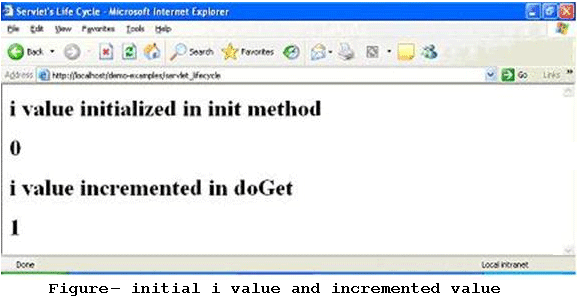
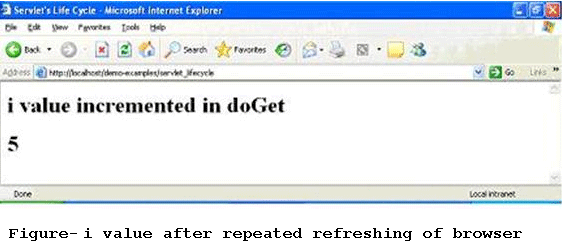
    Eureka! Here’s the output of our first servlet. After a long and pain staking effort, we finally got an output! As mentioned in Section 1.2.3. you can keep refreshing the browser window and see for yourself as how i value is incremented (a proof that the doGet is called every time you re-invoke a servlet).

Introduction to Java Servlets

Java Servlets are server side Java programs that require either a Web Server or an Application Server for execution. Examples for Web Servers include Apache’s Tomcat Server and Macromedia’s JRun. Web Servers include IBM’s Weblogic and BEA’s Websphere server. Examples for other Server programs include Java Server Pages (JSPs) and Enterprise Java Beans (EJBs). In the forthcoming sections, we will get acquainted with Servlet fundamentals and other associated information required for creating and executing Java Servlets.

  1. Basic Servlet Structure

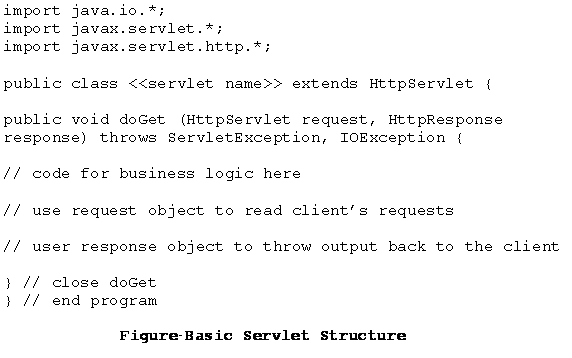
    As seen earlier, Java servlets are server side programs or to be more specific; web applications that run on servers that comply HTTP protocol. The javax.servlet and javax.servlet.http packages provide the necessary interfaces and classes to work with servlets. Servlets generally extend the HttpServlet class and override the doGet or the doPost methods. In addition, other methods such as init, service and destroy also called as life cycle methods might be used which will be discussed in the following section. The skeleton of a servlet is given in Figure


  1. A Servlet’s Life Cycle
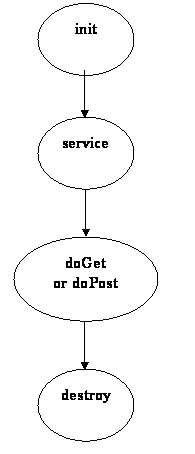
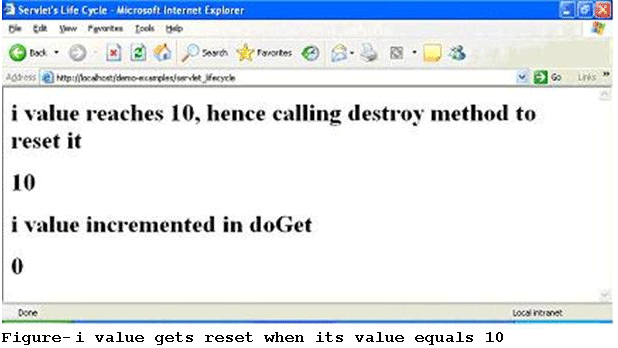
    The first time a servlet is invoked, it is the init method which is called. And remember that this is called only once during the lifetime of a servlet. So, you can put all your initialization code here. This method next calls the service method. The service method in turn calls the doGet or doPost methods (whichever the user has overridden). Finally, the servlet calls the destroy method. It is in a sense equivalent to the finally method. You can reset or close references / connections done earlier in the servlet’s methods (e.g. init, service or doGet /doPost). After this method is called, the servlet ceases to exist for all practical purposes. However, please note that it is not mandatory to override all these methods. More often than not, it is the doGet or doPost method used with one or more of the other life cycle methods.


  2. A Servlet Program


    Output Screens

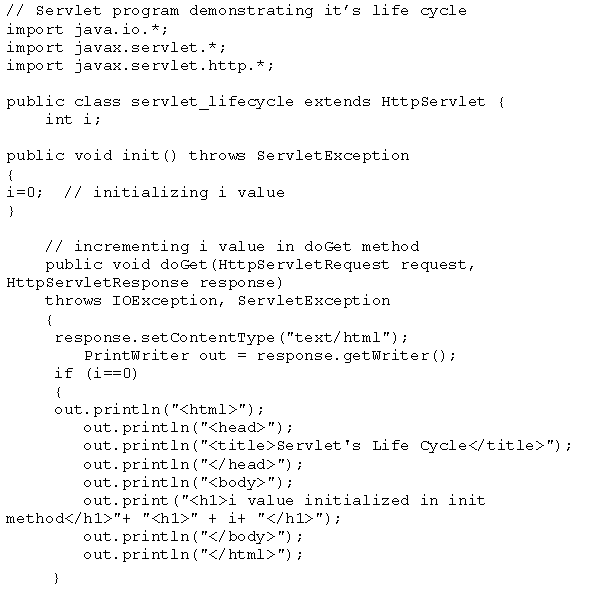
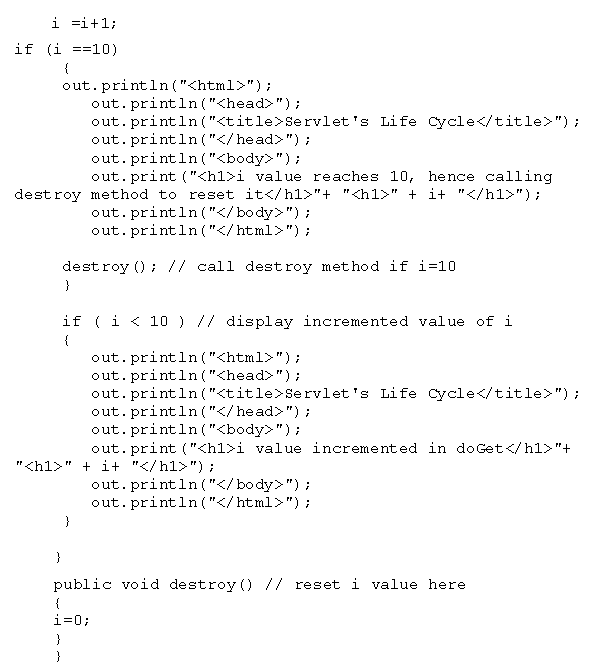
    To appreciate the execution of the servlet life cycle methods, keep refreshing the browser (F5 in Windows). In the background, what actually happens is – with each refresh, the doGet method is called which increments i’s value and displays the current value. Find below the screen shots (Figures 5 through 7) captured at random intervals. The procedure to run the servlets using a Web Server will be demonstrated in the next section (1.3.).


Introduction to Server Side Programming

All of us (or most of us) would have started programming in Java with the ever famous “Hello World!” program. If you can recollect, we saved this file with a .java extension and later compiled the program using javac and then executed the class file with java. Apart from introducing you to the language basics, the point to be noted about this program is that – “It is a client side program”. This means that you write, compile and also execute the program on a client machine (e.g. Your PC). No doubt, this is the easiest and fastest way to write, compile and execute programs. But, it has little practical significance when it comes to real world programming.

  1. Why Server Side Programming?

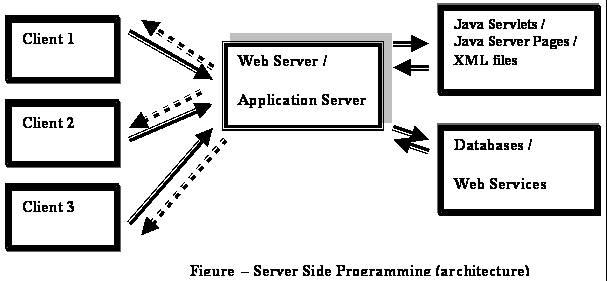
    Though it is technically feasible to implement almost any business logic using client side programs, logically or functionally it carries no ground when it comes to enterprise applications (e.g. banking, air ticketing, e-shopping etc.). To further explain, going by the client side programming logic; a bank having 10,000 customers would mean that each customer should have a copy of the program(s) in his or her PC which translates to 10,000 programs! In addition, there are issues like security, resource pooling, concurrent access and manipulations to the database which simply cannot be handled by client side programs. The answer to most of the issues cited above is – “Server Side Programming”. Figure-1 illustrates Server side architecture in the simplest terms.


  2. Advantages of Server Side Programs

    The list below highlights some of the important advantages of Server Side programs.
    1. All programs reside in one machine called the Server. Any number of remote machines (called clients) can access the server programs.
    2. New functionalities to existing programs can be added at the server side which the clients’ can advantage without having to change anything from their side.
    3. Migrating to newer versions, architectures, design patterns, adding patches, switching to new databases can be done at the server side without having to bother about clients’ hardware or software capabilities.
    4. Issues relating to enterprise applications like resource management, concurrency, session management, security and performance are managed by service side applications.
    5. They are portable and possess the capability to generate dynamic and user-based content (e.g. displaying transaction information of credit card or debit card depending on user’s choice).

  3. Types of Server Side Programs
    1. Active Server Pages (ASP)
    2. Java Servlets
    3. Java Server Pages (JSPs)
    4. Enterprise Java Beans (EJBs)
    5. PHP

    To summarize, the objective of server side programs is to centrally manage all programs relating to a particular application (e.g. Banking, Insurance, e-shopping, etc). Clients with bare minimum requirement (e.g. Pentium II, Windows XP Professional, MS Internet Explorer and an internet connection) can experience the power and performance of a Server (e.g. IBM Mainframe, Unix Server, etc) from a remote location without having to compromise on security or speed. More importantly, server programs are not only portable but also possess the capability to generate dynamic responses based on user’s request.

JAVA SERVLETS – An Overview

This tutorial covers concepts pertaining to Server side programming in general and Java Servlets in particular. In addition, it demonstrates as how to create and compile a simple Servlet and finally execute it using a Web Server such as an Apache Tomcat Server. It also guides the student through a step by step approach as how to install the above Server, configure it and create the relevant folders and files. After completion of this tutorial, the student would not only be familiar with Servlet fundamentals, but also get hands-on experience in terms of creating and executing simple Servlet programs.

  1. Introduction to Server Side Programming
  2. Introduction to Java Servlets
  3. Installation, Configuration and running Servlets

Advantages of Servlets over CGI

Servlets are server side components that provides a powerful mechanism for developing server web applications for server side. Earlier CGI was developed to provide server side capabilities to the web applications. Although CGI played a major role in the explosion of the Internet, its performance, scalability and reusability issues make it less than optimal solutions. Java Servlets changes all that. Built from ground up using Sun's write once run anywhere technology java servlets provide excellent framework for server side processing.

Using servlets web developers can create fast and efficient server side applications and can run it on any servlet enabled web server. Servlet runs entirely inside the Java Virtual Machine. Since the servlet runs on server side so it does not depend on browser compatibility.

Servlets have a number of advantages over CGI and other API's. They are:

  1. Platform Independence
    Servlets are written entirely in java so these are platform independent. Servlets can run on any Servlet enabled web server. For example if you develop an web application in windows machine running Java web server, you can easily run the same on apache web server (if Apache Serve is installed) without modification or compilation of code. Platform independency of servlets provide a great advantages over alternatives of servlets.
  2. Performance
    Due to interpreted nature of java, programs written in java are slow. But the java servlets runs very fast. These are due to the way servlets run on web server. For any program initialization takes significant amount of time. But in case of servlets initialization takes place first time it receives a request and remains in memory till times out or server shut downs. After servlet is loaded, to handle a new request it simply creates a new thread and runs service method of servlet. In comparison to traditional CGI scripts which creates a new process to serve the request.
  3. Extensibility
    Java Servlets are developed in java which is robust, well-designed and object oriented language which can be extended or polymorphed into new objects. So the java servlets take all these advantages and can be extended from existing class to provide the ideal solutions.
  4. Safety
    Java provides very good safety features like memory management, exception handling etc. Servlets inherits all these features and emerged as a very powerful web server extension.
  5. Secure
    Servlets are server side components, so it inherits the security provided by the web server. Servlets are also benefited with Java Security Manager.

Advantages of Servlets over CGI

Servlets are server side components that provides a powerful mechanism for developing server web applications for server side. Earlier CGI was developed to provide server side capabilities to the web applications. Although CGI played a major role in the explosion of the Internet, its performance, scalability and reusability issues make it less than optimal solutions. Java Servlets changes all that. Built from ground up using Sun's write once run anywhere technology java servlets provide excellent framework for server side processing.

Using servlets web developers can create fast and efficient server side applications and can run it on any servlet enabled web server. Servlet runs entirely inside the Java Virtual Machine. Since the servlet runs on server side so it does not depend on browser compatibility.

Servlets have a number of advantages over CGI and other API's. They are:

  1. Platform Independence
    Servlets are written entirely in java so these are platform independent. Servlets can run on any Servlet enabled web server. For example if you develop an web application in windows machine running Java web server, you can easily run the same on apache web server (if Apache Serve is installed) without modification or compilation of code. Platform independency of servlets provide a great advantages over alternatives of servlets.
  2. Performance
    Due to interpreted nature of java, programs written in java are slow. But the java servlets runs very fast. These are due to the way servlets run on web server. For any program initialization takes significant amount of time. But in case of servlets initialization takes place first time it receives a request and remains in memory till times out or server shut downs. After servlet is loaded, to handle a new request it simply creates a new thread and runs service method of servlet. In comparison to traditional CGI scripts which creates a new process to serve the request.
  3. Extensibility
    Java Servlets are developed in java which is robust, well-designed and object oriented language which can be extended or polymorphed into new objects. So the java servlets take all these advantages and can be extended from existing class to provide the ideal solutions.
  4. Safety
    Java provides very good safety features like memory management, exception handling etc. Servlets inherits all these features and emerged as a very powerful web server extension.
  5. Secure
    Servlets are server side components, so it inherits the security provided by the web server. Servlets are also benefited with Java Security Manager.

Advantages of Java Servlets

  1. Portability
  2. Powerful
  3. Efficiency
  4. Safety
  5. Integration
  6. Extensibilty
  7. Inexpensive

Each of the points are defined below:

Portability
As we know that the servlets are written in java and follow well known standardized APIs so they are highly portable across operating systems and server implementations. We can develop a servlet on Windows machine running the tomcat server or any other server and later we can deploy that servlet effortlessly on any other operating system like Unix server running on the iPlanet/Netscape Application server. So servlets are write once, run anywhere (WORA) program.

Powerful
We can do several things with the servlets which were difficult or even impossible to do with CGI, for example the servlets can talk directly to the web server while the CGI programs can't do. Servlets can share data among each other, they even make the database connection pools easy to implement. They can maintain the session by using the session tracking mechanism which helps them to maintain information from request to request. It can do many other things which are difficult to implement in the CGI programs.

Efficiency
As compared to CGI the servlets invocation is highly efficient. When the servlet get loaded in the server, it remains in the server's memory as a single object instance. However with servlets there are N threads but only a single copy of the servlet class. Multiple concurrent requests are handled by separate threads so we can say that the servlets are highly scalable.

Safety
As servlets are written in java, servlets inherit the strong type safety of java language. Java's automatic garbage collection and a lack of pointers means that servlets are generally safe from memory management problems. In servlets we can easily handle the errors due to Java's exception handling mechanism. If any exception occurs then it will throw an exception.

Integration
Servlets are tightly integrated with the server. Servlet can use the server to translate the file paths, perform logging, check authorization, and MIME type mapping etc.

Extensibility
The servlet API is designed in such a way that it can be easily extensible. As it stands today, the servlet API support Http Servlets, but in later date it can be extended for another type of servlets.

Inexpensive
There are number of free web servers available for personal use or for commercial purpose. Web servers are relatively expensive. So by using the free available web servers you can add servlet support to it.

Advantages of Java Servlets

  1. Portability
  2. Powerful
  3. Efficiency
  4. Safety
  5. Integration
  6. Extensibilty
  7. Inexpensive

Each of the points are defined below:

Portability
As we know that the servlets are written in java and follow well known standardized APIs so they are highly portable across operating systems and server implementations. We can develop a servlet on Windows machine running the tomcat server or any other server and later we can deploy that servlet effortlessly on any other operating system like Unix server running on the iPlanet/Netscape Application server. So servlets are write once, run anywhere (WORA) program.

Powerful
We can do several things with the servlets which were difficult or even impossible to do with CGI, for example the servlets can talk directly to the web server while the CGI programs can't do. Servlets can share data among each other, they even make the database connection pools easy to implement. They can maintain the session by using the session tracking mechanism which helps them to maintain information from request to request. It can do many other things which are difficult to implement in the CGI programs.

Efficiency
As compared to CGI the servlets invocation is highly efficient. When the servlet get loaded in the server, it remains in the server's memory as a single object instance. However with servlets there are N threads but only a single copy of the servlet class. Multiple concurrent requests are handled by separate threads so we can say that the servlets are highly scalable.

Safety
As servlets are written in java, servlets inherit the strong type safety of java language. Java's automatic garbage collection and a lack of pointers means that servlets are generally safe from memory management problems. In servlets we can easily handle the errors due to Java's exception handling mechanism. If any exception occurs then it will throw an exception.

Integration
Servlets are tightly integrated with the server. Servlet can use the server to translate the file paths, perform logging, check authorization, and MIME type mapping etc.

Extensibility
The servlet API is designed in such a way that it can be easily extensible. As it stands today, the servlet API support Http Servlets, but in later date it can be extended for another type of servlets.

Inexpensive
There are number of free web servers available for personal use or for commercial purpose. Web servers are relatively expensive. So by using the free available web servers you can add servlet support to it.

Features of Servlet 2.5

This version has been released on September 26, 2005 by the Sun MicroSystems. It is not necessary that all web servers and application servers support the features of Servlet 2.5. Still most of the popular containers like Tomcat 5.5 and JBoss 4.0 support Servlet 2.4.

The list of the added features is given below:

  1. Dependency on J2SE 5.0: The minimum platform requirement for Servlet 2.5 is JDK 1.5. Servet 2.5 can't be used in versions below than JDK1.5. All the available features of JDK1.5 like generics, autoboxing, an improved for loop etc are guaranteed available to Servlet 2.5 programmers.
  2. Support For annotations: Annotations provide a mechanism for decorating java code constructs (classes, methods, fields, etc.) with metadata information. Annotations are mark code in such a way that code processors may alter their behavior based on the metadata information.
  3. Several web.xml convenience: Servlet 2.5 introduces several small changes to the web.xml file to make it more convenient to use. For example while writing a , we can now use an asterisk in a which will represent all servlets as well as JSP.

    Previously we used to do


    FilterName
    FilterName


    Now,


    FilterName
    *


    Previously in or there used to be only one , but now we can have multiple , like


    abc
    /abc/*
    /abc/*


    Apart from these changes, many more facilities added in web.xml.
  4. A Handful of removed restrictions: Servlet 2.5 removed a few restrictions around error handling and session tracking. Now it has removed the restriction that the could not call the setStatus() method to alter the error code that triggered them. In session tracking, Servlet 2.5 eased a rule that a servlet called by RequestDispatcher include() couldn't set response headers.
  5. Some edge case clarifications: The servlet 2.4 specification says that before calling request.getReader() we must call request.setCharacterEncoding(). However there is no such clarification given why it is so.

Features of Servlet 2.5

This version has been released on September 26, 2005 by the Sun MicroSystems. It is not necessary that all web servers and application servers support the features of Servlet 2.5. Still most of the popular containers like Tomcat 5.5 and JBoss 4.0 support Servlet 2.4.

The list of the added features is given below:

  1. Dependency on J2SE 5.0: The minimum platform requirement for Servlet 2.5 is JDK 1.5. Servet 2.5 can't be used in versions below than JDK1.5. All the available features of JDK1.5 like generics, autoboxing, an improved for loop etc are guaranteed available to Servlet 2.5 programmers.
  2. Support For annotations: Annotations provide a mechanism for decorating java code constructs (classes, methods, fields, etc.) with metadata information. Annotations are mark code in such a way that code processors may alter their behavior based on the metadata information.
  3. Several web.xml convenience: Servlet 2.5 introduces several small changes to the web.xml file to make it more convenient to use. For example while writing a , we can now use an asterisk in a which will represent all servlets as well as JSP.

    Previously we used to do


    FilterName
    FilterName


    Now,


    FilterName
    *


    Previously in or there used to be only one , but now we can have multiple , like


    abc
    /abc/*
    /abc/*


    Apart from these changes, many more facilities added in web.xml.
  4. A Handful of removed restrictions: Servlet 2.5 removed a few restrictions around error handling and session tracking. Now it has removed the restriction that the could not call the setStatus() method to alter the error code that triggered them. In session tracking, Servlet 2.5 eased a rule that a servlet called by RequestDispatcher include() couldn't set response headers.
  5. Some edge case clarifications: The servlet 2.4 specification says that before calling request.getReader() we must call request.setCharacterEncoding(). However there is no such clarification given why it is so.